Building a Customizable WebChat for Customer Service and Lead Generation
WebChat has become one of the main tools for interaction between companies and customers in the digital environment.
Level: Intermediate | Reading Time: 5 min
Building a Customizable WebChat for Customer Service and Lead Generation
WebChat has become one of the main tools for interaction between companies and customers in the digital environment.
In practice, it works as a pluggable component that can be embedded on any website, allowing visitors to start real-time conversations with the company.
In addition to serving as a customer service channel, WebChat also plays a strategic role in capturing and qualifying leads, keeping potential customers engaged throughout their browsing journey.
Many times a user visits a website with a simple question, but ends up abandoning the page before making a purchase or getting in touch. A well-implemented WebChat allows that interest to be captured and turns a visit into a business opportunity.
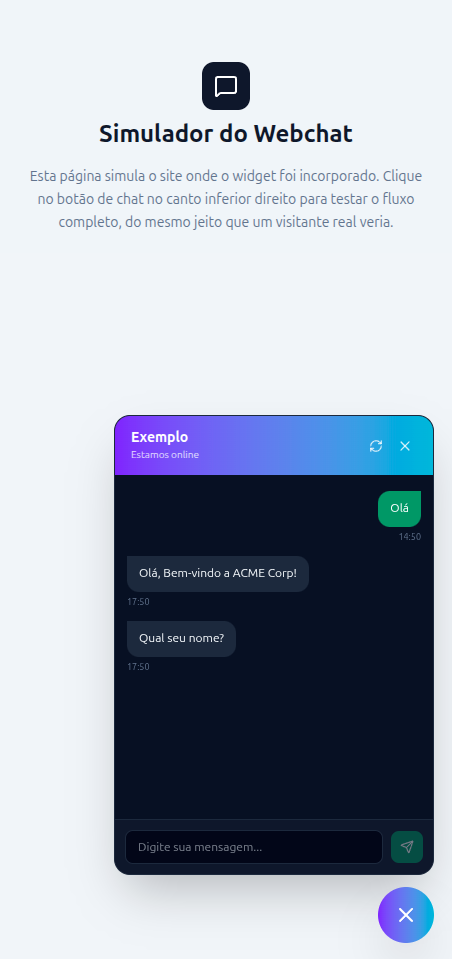
Automated Service with Chatbots
One of the most common features in modern WebChat platforms is the use of chatbots.
Before handing off the conversation to a human operator, the chatbot can perform a series of tasks:
- Collect the customer's name
- Capture phone number or email
- Identify the subject of the request
- Qualify the lead
- Route to the correct department
- Answer frequently asked questions
Example:
Olá, seja bem-vindo!

Qual é o seu nome?
Marcelo
Qual assunto deseja tratar?

1 - Comercial
2 - Suporte
3 - Financeiro
At the end of this flow, the human operator already receives relevant information to continue the conversation.
Using Conversation Flows
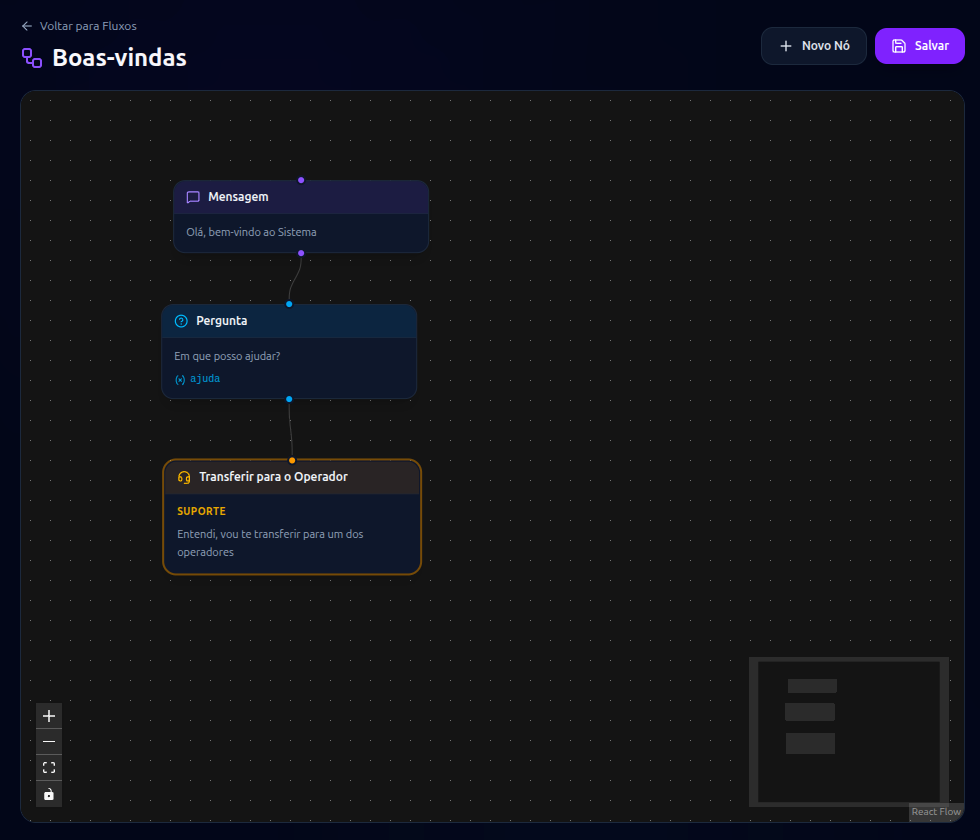
To make the automation flexible, it's common to use a configurable flow mechanism.
In this model, the chatbot has no fixed rules in the code.
Instead, there is a visual flow containing:
- Messages
- Questions
- Variables
- Conditions
- External integrations
- Handoffs to operators
This allows the team to adjust the chatbot's behavior without needing new system releases.
Administrative Screen for Management
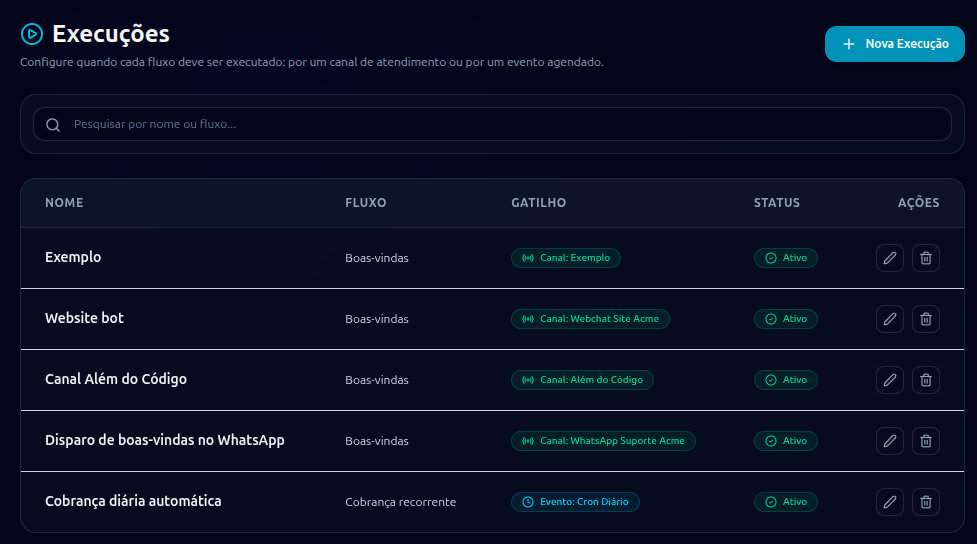
Another important component is the admin panel.
It allows users to configure new WebChat channels without needing to change any code.
Common features:
- Create channels
- Enable or disable channels
- Define visual identity
- Link flows
- Configure operators
- Configure custom domains
Linking Flows
When creating a new channel, you can define which flow will be used.
Example:
Canal:
Site Comercial

Fluxo:
Pré-vendas
Another channel might use:
Canal:
Portal de Clientes

Fluxo:
Suporte Técnico
This allows different behaviors for each context.
Custom Domains
A feature highly valued by companies is the use of their own domains.
Instead of using a generic platform URL:
https://webchat.plataforma.com
it's possible to use:
https://webchat.empresadocliente.com.br
Benefits:
- Greater user trust
- Stronger branding
- Better browsing experience
- More professional appearance
This approach is common in White Label SaaS solutions.
Real-Time Communication with WebSockets
For WebChat to work smoothly, WebSockets are typically used.
When opening the chat:
Usuário
    ↓
Conecta no WebSocket
    ↓
Autentica sessão
    ↓
Recebe eventos em tempo real
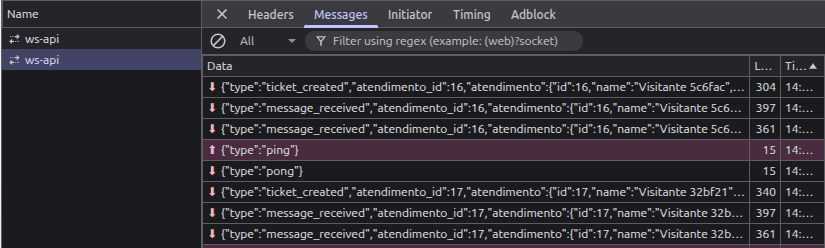
Establishing the Session
During the connection, session information is sent:
{
  "sessionId": "abc123",
  "channelId": "site-comercial"
}
This data allows the visitor to be correctly identified.
Receiving Events
When a new message is sent:
Operador → Cliente
or
Bot → Cliente
an event is fired through the WebSocket.
The frontend receives this event and updates the conversation instantly.
No need to:
Atualizar página
Pressionar F5
Realizar polling constante
WebChat Customization
Every company has its own visual identity.
That's why a modern WebChat must allow customizations such as:
- Primary color
- Secondary color
- Logo
- Agent avatar
- Initial message
- Virtual assistant name
- Widget position
- Language
Example:
Empresa A → Azul
Empresa B → Verde
Empresa C → Preto
All using the same infrastructure.
Persistence Throughout Navigation
One of the most common mistakes in simple WebChat implementations is assuming the user will stay put waiting for a reply.
In reality, behavior tends to be different.
Example:
- The customer starts a conversation.
- Keeps browsing the catalog.
- Views other products.
- Checks prices.
- Returns to the chat minutes later.
WebChat needs to follow this journey.
Keeping the Conversation Active
Even when the user navigates between pages, the conversation must remain available.
Example:
Página Produto A
      ↓
Página Produto B
      ↓
Carrinho
      ↓
Checkout
The conversation stays active throughout the entire browsing session.
Session Recovery
If the browser is closed or refreshed, the session can be recovered through:
- Cookies
- Local Storage
- Session Storage
- Temporary tokens
Allowing the user to pick up exactly where they left off.
Scalability
A WebChat can start out serving dozens of users and quickly grow to thousands of simultaneous conversations.
For this reason, the architecture must account for:
- Load balancing
- Asynchronous queues
- Horizontal scalability
- Distributed processing
- Stateless services
- Resilient WebSockets
Ensuring that the growth of the operation doesn't compromise the user experience.
💡 Need technical support to architect resilient, scalable systems?
I'm Marcelo Alberico Macedo, Senior Software Engineer and Architect. I hold an MBA from USP/Esalq and design microservices ecosystems, messaging, and high-availability platforms for enterprise-grade products.